
• हिन्दी
  • ગુજરાતી
  • বাংলা
  • తెలుగు
  • मराठी
  • ಕನ್ನಡ
  • money9
  • Insurance
  • Saving
  • Mutual Funds
  • Mirae Asset MF
  • Breaking Briefs
downloadDownload The App
Close
  • Home
  • Videos
  • Podcast
  • Banking
  • Bulletin
  • Gold
  • Healthcare
  • Real Estate
  • Tax
  • Travel
  • Survey 2023
  • Survey Report
  • Breaking Briefs
  • Insurance
  • Savings
  • Loan
  • Crypto
  • Investment
  • Mutual Funds
  • Real Estate
  • Tax
  • Exclusive
  • Home / Photo Gallery

New I-T portal: File tax returns following these steps

The e-verification should be done within a time limit of 120 days or else ITR will become invalid

  • Money9
  • Last Updated : June 28, 2021, 17:11 IST
  • Follow
1/8
Step 1: Log in to eportal.incometax.gov.in with your credentials.
2/8
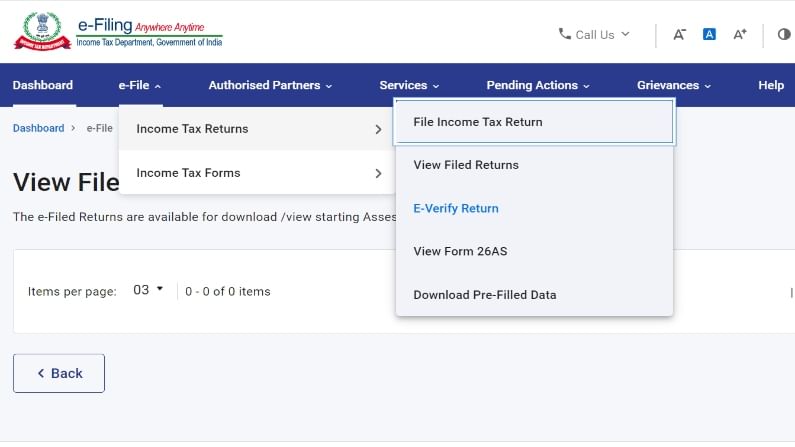
Step 2: Click on the E-file tab, under income tax return click on e-verify return.
3/8
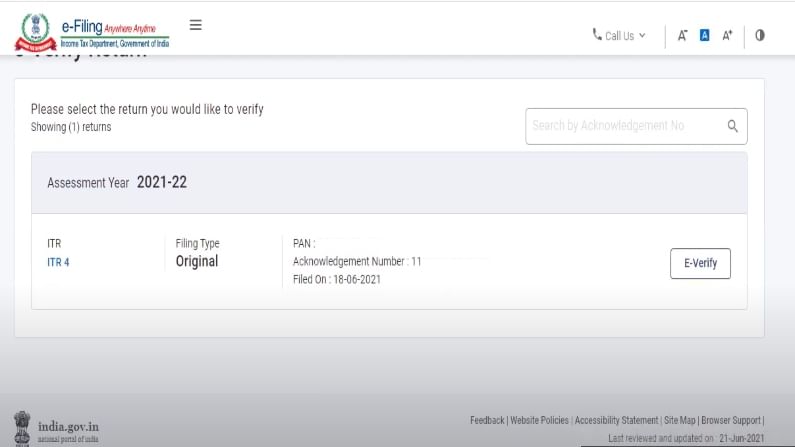
Step 3: Now you will get the dashboard of filed ITR - click on e-verify.
4/8
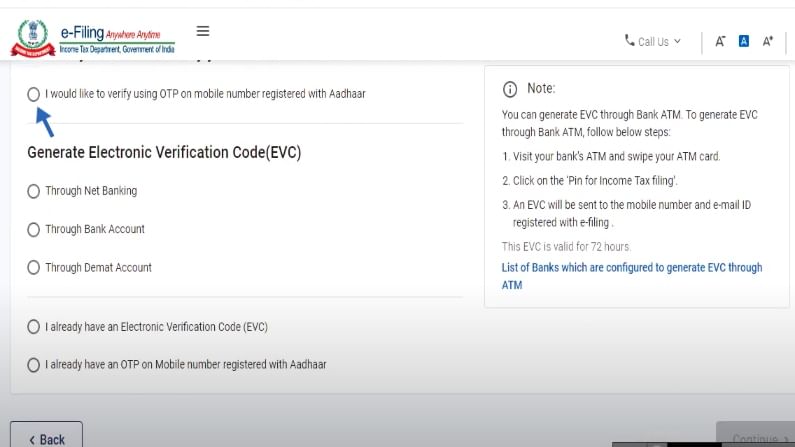
Step 4: You will now be directed to a new page where you can get options to e to verify with net banking, Aadhaar, Bank account, or Demat account.
5/8
Step 5: Here we are choosing the option e-verify with Aadhaar by selecting the column.
6/8
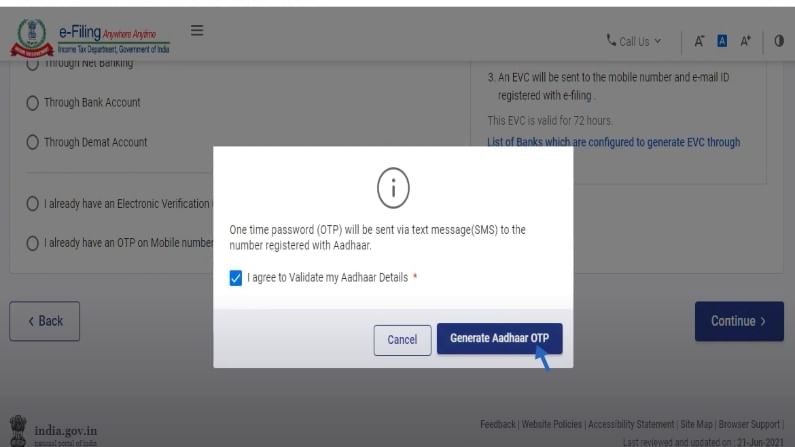
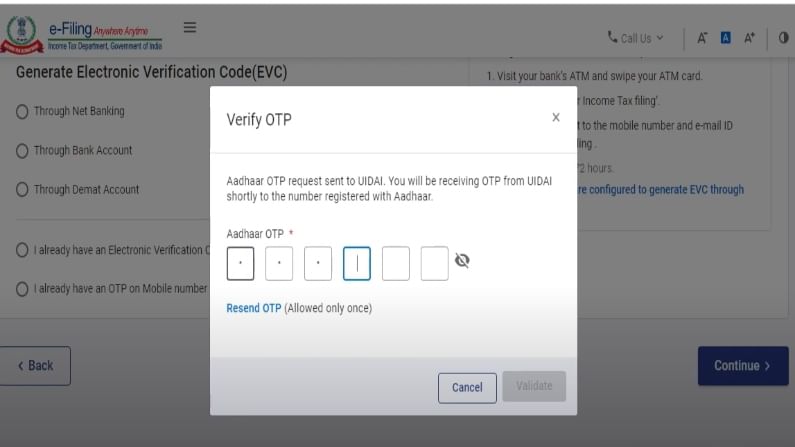
Step 6: It will now show a pop-up asking to generate OTP for Aadhar verification.
7/8
Step 7: Now enter OTP received on your Aadhaar verified mobile number on the next pop-up screen and click on validate.
8/8
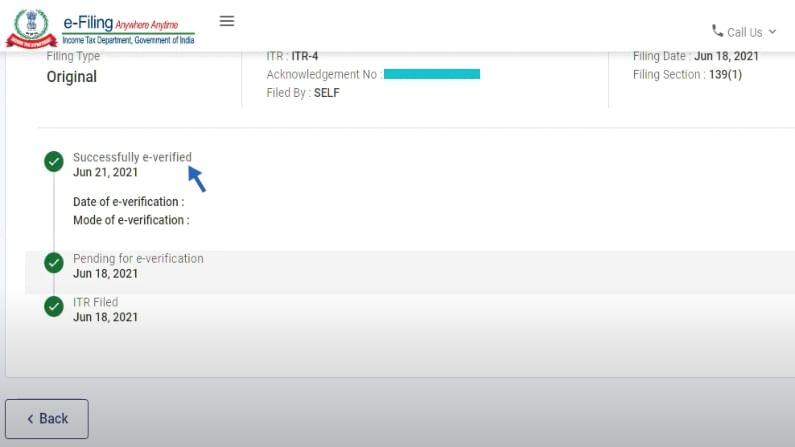
Step 8: After few minutes of submission, go to the home page - e-file tab, under income tax return click on view filed returns. Here you can see that it's verified.
Published: June 28, 2021, 17:11 IST

Download Money9 App for the latest updates on Personal Finance.

  • income tax

Related

  • These nine countries are now accepting Indian travellers
  • Nine-point guide to reduce your debt
  • Streaming on Money9 today: Shows for you and your wallet
  • Rakesh Jhunjhunwala: Nine tips from the ace investor
  • Streaming on Money9 today: Shows for you and your wallet
  • Streaming on Money9 today: Shows for you and your wallet

Latest

  • 1. Know the correct way to get KYC done!
  • 2. Why health insurance claim gets rejected?
  • 3. Power to Respond!
  • 4. What is Asset Under Management?
  • 5. No Worries on Medical Expenses!
  • Trending Stories

  • DGCA प्रमुख ने सुचारू उड़ान संचालन सुनिश्चित करने के लिए पायलटों से मांगा सहयोग
  • रेपो दर में कटौती से घर के लिए कर्ज होगा सस्ता, मांग बढ़ेगी: रियल एस्टेट
  • मीशो के 5,421 करोड़ रुपये के आईपीओ को दूसरे दिन मिला 7.97 गुना अभिदान
  • इंडिगो को अगले साल 10 फरवरी तक उड़ान संचालन पूरी तरह बहाल होने की उम्मीद
  • Indigo की 200 से ज्यादा फ्लाइट रद्द, हजारों पैसेंजर फंसे
  • TV9 Sites

  • TV9 Hindi
  • TV9Telugu.com
  • TV9 Marathi
  • TV9 Gujarati
  • TV9 Kannada
  • TV9 Bangla
  • TV9 English
  • News9 Live
  • Trends9
  • Tv9tamilnews
  • Assamtv9
  • Malayalamtv9
  • Money9 Sites

  • Money9 Hindi
  • Money9 English
  • Money9 Marathi
  • Money9 Telugu
  • Money9 Gujarati
  • Money9 Kannada
  • Money9 Bangla
  • Money9live
  • Topics

  • Insurance
  • Savings
  • Loan
  • Stocks
  • Mutual Funds
  • Real Estate
  • Tax
  • Crypto
  • Exclusive
  • Follow us

  • FaceBook
  • Twitter
  • Youtube
  • Instagram
  • Linkedin
  • Download App

  • play_store
  • App_store
  • Contact Us
  • About Us
  • Advertise With Us
  • Privacy & Cookies Notice
  • Complaint Redressal
  • Copyright © 2025 Money9. All rights reserved.
  • share
  • Facebook
  • Twitter
  • Whatsapp
  • LinkedIn
  • Telegram
close